Agencies: Six-Week System to Manage Influencer Campaigns, Scale 8–12
12 min read

Manage multiple influencer campaigns by running every one through the same six-phase framework, a shared timeline template, and a single tool where briefs, approvals, and reporting live. That combination cuts the mental cost of jumping between clients and turns campaign growth into a staffing question instead of a chaos problem. Everything below breaks down how to build that system and where to bolt on automation first.
TL;DR:
- Running multiple influencer campaigns with a standardized six-phase framework increases manageability and scalability, especially for up to 8 to 12 campaigns per coordinator.
- Locking in key elements such as KPIs, channel mix, budget guardrails, and messaging before brief development reduces costly rework and approval delays.
- Using separate workspaces for each client or campaign prevents time-wasting tab switching and improves process consistency through defined workflows.
- Automating onboarding, deadline reminders, and reporting tasks optimizes workflow, but platforms must support workflow templates, permission scoping, clean data export, and role-based notifications.
- Standardized KPIs mapped to campaign phases and templated reporting enable reliable measurement, comparison, and learning transfer across diverse client campaigns.
Table of Contents
- Build a Repeatable Influencer Campaign Framework for Scale
- Why Separate Workspaces Beat One Giant Tracker
- What Does a Six-Week Campaign Timeline Look Like?
- Which Tools Actually Save Coordination Time?
- How Do You Standardize KPIs Across Campaigns?
- How Many Campaigns Should One Coordinator Handle?
- How Do You Manage Brand Safety Across Many Creators?
- Where Influenna Fits Into a Coordinator's Toolkit
- What I'd Fix First If I Ran Your Campaign Calendar
- Sources
- FAQ
Build a Repeatable Influencer Campaign Framework for Scale
Every campaign that runs through the same six phases gets easier to manage the second and third time. The phases are Strategy, Creative, Pre-launch, Launch, Monitor/Optimize, and Post-campaign analysis. Skip locking a phase before moving to the next, and you'll spend week five rebuilding what should have been settled in week one.
Four things need sign-off before a single creator gets briefed: the KPI the campaign is judged on, the channel mix, budget guardrails, and the core messaging framework everyone (creators included) references. Nail those down early and you avoid the most expensive kind of rework: reshoots and re-approvals after a creator has already posted a draft.
This structure is what makes running five or ten campaigns in parallel survivable. A coordinator jumping between accounts doesn't have to relearn each client's process, because the process is identical. The details change; the spine doesn't.
A checklist worth pasting straight into your project management tool:
- Confirm the primary KPI and how it will be measured before creative starts
- Lock channel mix (Instagram, TikTok, YouTube) and rationale for each
- Set a hard budget guardrail per creator tier
- Draft one messaging framework doc every creator brief references
- Assign phase owners so handoffs don't stall waiting on "whoever's free"
Why Separate Workspaces Beat One Giant Tracker
Running five clients out of one shared spreadsheet feels efficient until you notice how much time gets lost just relocating context every time you switch tabs. Gallup's research on workplace interruptions found that recovering from a disruption takes real, measurable time, and coordinators juggling six accounts in one messy tracker are interrupting themselves all day long. Separate client or campaign workspaces solve this by giving each account its own boundaries: its own timeline, its own approval queue, its own reporting thread.
Inside each workspace, standardize the same five-step workflow every time:
- Brief goes out using a fixed template, not a fresh email
- Contract terms get confirmed against the brief before any content starts
- Draft content is submitted through one designated channel
- Approval runs through a named decision maker with a set turnaround window
- Reporting closes the loop against the KPIs set in Strategy
Assign clear owners for each handoff, and set cadence expectations up front: daily check-ins during Launch week, weekly syncs otherwise, and a milestone review at each phase gate. Enforce a fixed brief template, consistent asset naming, and basic version control, and you'll stop losing twenty minutes a day hunting for "final_v3_ACTUAL.mp4."
Pro Tip: Name your asset files with the campaign code and date first, not the creator's name last. It sorts better and it's the first thing you search for when a client asks "where's the latest cut?"
What Does a Six-Week Campaign Timeline Look Like?
A six-week arc with go-live landing around day 28 gives a campaign enough runway to plan properly on one side and measure properly on the other. That structure isn't arbitrary. Monday uses roughly this same shape: the first three to four weeks cover strategy, creative development, and pre-launch approvals, and the back half covers launch, active monitoring, and post-campaign analysis.
Before go-live, the calendar needs:
- Analytics and UTM setup, finished and tested, not "in progress"
- Hero asset production locked with buffer time for one round of revisions
- A defined approval window, ideally 48 to 72 hours, so drafts don't sit
- Paid amplification pacing mapped against organic post dates
For always-on or monthly-wave programs, the same six-week logic still applies. Just treat each wave as its own mini arc nested inside the larger relationship, rather than trying to force a twelve-month retainer into a single timeline. Miro's campaign timeline template and a basic Gantt chart both work well for visualizing this. Put UTMs and analytics tracking on the calendar itself, as a task with a deadline, not a mental note.
Which Tools Actually Save Coordination Time?
Centralize four categories: a project and timeline tool, an approval workflow, an influencer CRM, and an analytics dashboard. Spreading these across four different apps is exactly the setup that causes most influencer programs to collapse under their own weight once a coordinator passes five or six active accounts.
Spreadsheets and scattered DMs work fine for one campaign. They stop working the moment a second and third client show up, because nothing about that system remembers state. A platform review from Worksuite makes the same point: centralizing approvals, deadlines, and analytics is what actually reduces coordination load, not adding more people to watch the spreadsheet.
Automate in this order, because it returns the most time for the least setup:
- Creator onboarding sequences (contract, payment info, brand guidelines)
- Deadline reminders tied to the approval window, not sent manually
- Request expirations, so nobody chases a creator who went quiet three weeks ago
- Basic reporting pulls (reach, engagement) that don't require a manual export
If you're evaluating a platform at RFP stage, test it against four things: does it ship workflow templates out of the box, can permissions be scoped per client, can data actually export cleanly, and does the pricing model survive you tripling your account count. Design notifications to be role-based and milestone-driven. A coordinator who gets pinged for every comment on every post will start ignoring all of them, including the ones that matter.
Pro Tip: Turn off notifications for anything below "approval needed" or "deadline in 24 hours." Everything else can live in a daily digest.
How Do You Standardize KPIs Across Campaigns?
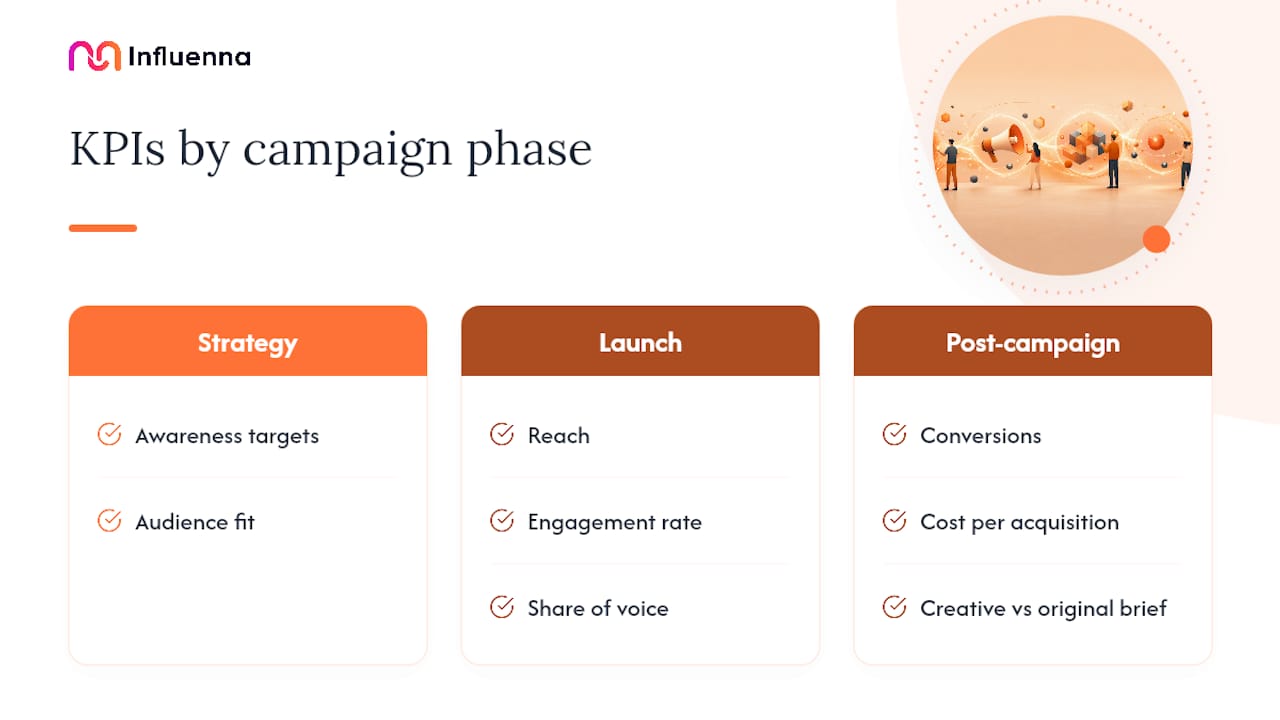
Map metrics to the phase they actually belong to, and stop treating every number as a launch-week number. Strategy-phase KPIs are about awareness targets and audience fit. Launch metrics are reach, engagement rate, and share of voice. Post-campaign metrics are conversions, cost per acquisition, and whether the creative held up against the original brief.
Running every client through the same measurement lens is what makes reporting comparable and learning transferable. Smart Insights' RACE framework, which maps paid, owned, and earned activity across Reach, Act, Convert, and Engage, gives coordinators a consistent structure to plug any campaign into, regardless of the client's category.
Every report should include the same four sections: KPIs against target, spend to date, attribution notes (what's tracked, what's estimated), and learnings for next time. None of that works if analytics setup happens after launch. UTM taxonomy and dashboard configuration belong on the pre-launch checklist, not the day-two fire drill.
The coordinator load gap: agencies running structured, templated workflows report handling 8 to 12 active campaigns per coordinator, compared to 3 to 5 on manual, spreadsheet-driven processes. The framework isn't overhead. It's what buys back the extra five accounts.
A ready reporting template built around this structure removes the "what goes in the deck" debate every single time.
How Many Campaigns Should One Coordinator Handle?
Calculate active campaign load by counting anything currently in Creative through Monitor/Optimize, not the full roster of dormant or wrapped accounts. The 8 to 12 campaign benchmark for structured workflows versus 3 to 5 for manual ones is the clearest signal you have that your bottleneck is process, not headcount.
Roster strategy matters as much as staffing math:
- Tier creators by campaign fit and current readiness, not just follower count
- Keep a standby pool of vetted creators for fast-turnaround requests
- Reuse asset briefs and approval steps across creators in the same tier to cut per-creator setup time
- Track which creators consistently hit deadlines and prioritize them for repeat bookings
A short onboarding checklist covering brief, deliverables, payment terms, and disclosure requirements shortens time-to-live noticeably, especially for creators you haven't worked with before. Standard briefs and recurring partnerships do more to cut admin time than any single tool purchase.
How Do You Manage Brand Safety Across Many Creators?
Vet every creator against the same short list before signing: audience provenance (are followers verified, estimated, or self-reported), a review of past posts for anything off-brand, and confirmation they understand disclosure requirements before content goes live. Regulatory bodies including the FTC require clear, conspicuous disclosure of paid or gifted partnerships, and that obligation sits with both the brand and the creator, not just one side.
- Flag any creator whose audience metrics can't be verified through the platform itself
- Route higher-risk creative (health, finance, anything politically adjacent) through a named senior approver, not the standard queue
- Document the contract terms covering disclosure before content is greenlit
Pro Tip: If a post causes damage, don't wait for a strategy meeting. Pull the paid amplification immediately, ask the creator to edit or remove within an agreed window, and have your holding statement drafted before you need it, not after.
Where Influenna Fits Into a Coordinator's Toolkit
This is a curated, four-sided marketplace connecting creators, brands, talent agencies, and influencer marketing agencies, with every account reviewed by a person before it gets marketplace access. That review step matters when you're trying to expand your standby roster without inheriting someone else's brand safety problem. Coordinators building out the templates mentioned above can pull the influencer brief template and reporting template directly from the Influenna blog as a starting point rather than building from scratch.
What I'd Fix First If I Ran Your Campaign Calendar
Three things, in order: lock one brief template this week and force every client onto it, sort your active creators into tiers so onboarding stops starting from zero, and set a two-week measurement baseline before you touch a fourth new account. Small, localized one-off campaigns can survive some improvisation. Anything running at scale across multiple clients can't. Centralize the process, not the creative judgment, and the Influenna blog has more of these templates if you want a head start.
— Igor
Sources
FAQ
What Is the Best Way to Manage Multiple Influencer Campaigns?
Run every campaign through the same six-phase framework (Strategy, Creative, Pre-launch, Launch, Monitor/Optimize, Post-campaign analysis), enforce a shared timeline template, and centralize briefs, approvals, and reporting in one tool. This is what separates agencies handling 8 to 12 campaigns per coordinator from those stuck at 3 to 5.
What Is the 5-3-2 Rule on Instagram Marketing?
It's a content mix guideline suggesting that out of every ten posts, five should share others' content or curated value, three should be original personal or brand content, and two should be promotional. It's a content ratio concept, not a campaign management framework, so it doesn't replace a timeline or KPI structure.
What Is the 3-2-1 Rule on Instagram?
Definitions vary across marketers, but a common version recommends three pieces of value-driven content, two pieces of engagement-focused content, and one promotional post within a given content cycle. Like the 5-3-2 rule, it's a content-planning heuristic rather than a campaign coordination method.
How Many Campaigns Can One Coordinator Realistically Manage?
With structured workflows and centralized tooling, coordinators can typically manage 8 to 12 active campaigns; without them, that number drops to roughly 3 to 5 on manual, spreadsheet-based processes.
What Should Go Into a Campaign Timeline Template?
A solid template covers strategy and KPI-setting, creative production, pre-launch approvals, a go-live point (commonly around day 28 of a six-week arc), active monitoring, and post-campaign analysis, with analytics and UTM setup completed before launch.