YouTube Watch Time: What It Means and How to Grow It
10 min read

Watch time is the total number of minutes viewers spend watching your public videos, added up across every play. It's the single metric YouTube leans on hardest when deciding what to recommend, and it's a gatekeeper for money: you need 4,000 hours of it, alongside 1,000 subscribers, before YouTube will even consider you for the YouTube Partner Program.
A few things trip creators up right away:
- Higher watch time signals to YouTube's recommendation system that your content holds attention, which tends to push it toward more viewers.
- Most Shorts feed time and any private or unlisted views don't count toward that 4,000-hour threshold, even though they show up elsewhere in your channel stats.
- Watch time and views measure different things: a video can rack up views fast while contributing very little total watch time if people bail after a few seconds.
Key Takeaways
Watch time drives both YouTube's recommendation algorithm and Partner Program eligibility, and only qualified long-form and livestream minutes count toward the watch time threshold.
| Point | Details |
|---|---|
| Watch time beats view count | Total minutes watched matters more to recommendations than raw view volume. |
| Qualified hours are narrow | Only public long-form videos and archived livestreams count toward the 4,000-hour YPP threshold. |
| Retention starts at second one | Most viewer drop-off happens in the first 30 seconds, so hooks deserve the most testing. |
| Sessions extend value | Playlists and end screens turn single views into longer, algorithm-friendly sessions. |
| Collaborations widen reach | Curated platforms like Influenna help creators find vetted partners for co-created content that can extend qualified watch time. |
Table of Contents
- How Does YouTube Calculate Watch Time?
- Where Do You Find Watch Time in YouTube Studio?
- What Watch Time Counts Toward the YouTube Partner Program?
- What Actually Increases Watch Time?
- How Many Views Do You Need for 4,000 Watch Hours?
- What Should You Test in Your First 30 Days?
- Sources
- FAQ
How Does YouTube Calculate Watch Time?
YouTube tracks watch time per second, not per view. If someone watches 90 seconds of your 10-minute video, that's 90 seconds added to your total, not a full "view's worth" of minutes. Partial views count proportionally, which is why a video with a million views and a weak hook can still underperform one with far fewer views but a loyal, patient audience.
The tracking spans multiple playback surfaces: your website, the mobile app, TV apps, and embedded players on other sites all feed minutes into the same pool. YouTube's own developer documentation defines the core metric as estimatedMinutesWatched, distinct from averageViewDuration, which divides that total by view count.
A few edge cases matter here:
- Your own views as the channel owner are filtered out automatically, along with bot and spam traffic.
- Analytics typically lag 24 to 48 hours behind real-time activity, so a sudden dip in Studio might just be a reporting delay, not an actual drop.
- Playback speed changes (1.5x, 2x) reduce the real-time seconds counted, while replays and rewinds add extra watch time on top of the original pass.
Pro Tip: If your watch time chart looks flat for a day or two after a big upload, wait 48 hours before panicking. Studio numbers stabilize as the batch processing catches up.
Where Do You Find Watch Time in YouTube Studio?
Watch time data lives in a few specific places, and each one answers a different question.
- Analytics > Overview gives you the top-line watch time (hours) number for whatever date range you select, plus a trend line.
- The Engagement tab breaks out watch time and average view duration per video, and includes the "Impressions and how they led to watch time" report, which shows whether a strong click-through rate is actually converting into minutes watched or just inflating your view count.
- Content and Reach reports show average percentage viewed and a retention graph mapping exactly where viewers drop off inside a single video.
- The Monetization tab shows your progress toward qualifying watch hours specifically, filtered to long-form public content.
For Shorts, Studio reports "engaged views" instead of the long-form average view duration metric, since Shorts are short enough that traditional AVD isn't a useful signal.
What Watch Time Counts Toward the YouTube Partner Program?
Only certain watch time counts toward the 4,000-hour YPP threshold, and this is where most creators get confused. According to YouTube's official guidance on qualified watch hours, qualified hours come from public long-form videos and archived livestreams.
What doesn't count:
- Private or unlisted video views
- Watch time on deleted videos
- Ad watch time
- Most Shorts feed time (Shorts monetization runs on a separate, view-based threshold instead)
The window is also rolling, not cumulative forever: YouTube counts qualifying hours from the trailing 12 months. That's why your Monetization tab total can differ from the lifetime watch time shown in channel Analytics; the Monetization view applies filters for public content, long-form format, and the 12-month window, while general Analytics doesn't.
Pro Tip: Keep a running spreadsheet that logs your monthly qualifying hours separately from total watch time. When older high-performing videos roll out of the 12-month window, you'll see it coming instead of getting blindsided by a stalled progress bar.
What Actually Increases Watch Time?
Fixing watch time starts with the first few seconds, not the editing polish later in the video. Most drop-off happens in the opening 30 seconds, so that's where testing pays off fastest.
- Test your hook and thumbnail together. Try two or three opening lines and thumbnail variants on similar videos, then compare average view duration, not just click-through rate. A high CTR with a weak retention graph usually means the thumbnail is over-promising.
- Edit for pacing, not polish. Cut dead air, trim slow intros, and use small cliffhangers or chapter markers to keep viewers moving forward instead of scrolling away.
- Build sessions, not just views. Playlists, end screens, and smart "up next" sequencing turn a single view into a multi-video session, and YouTube tends to reward content that keeps people on the platform longer, not just per-video.
- Balance CTR against retention. A thumbnail that pulls in the wrong audience will spike clicks and tank average view duration. Aim for the click that comes from someone who actually wants what's inside the video.
- Capture minutes from outside YouTube. Embedding videos on high-traffic partner sites or blog posts adds qualified minutes you'd otherwise miss, and you can track embed referral sources in Studio to confirm those minutes are crediting properly.
- Pick your length deliberately. Longer videos aren't automatically better; a 4-minute video with 70% retention beats a 12-minute video with 20% retention on every metric that matters. Use your own AVD-by-length data in the Content tab to find your channel's sweet spot.
If you're repurposing long-form content into shorter clips or written recaps, a tool like Youtube to Transcript can speed up pulling quotes and chapter markers without re-watching the whole video yourself.
Pro Tip: Run one variable at a time. If you change the hook and the thumbnail in the same video, you won't know which one moved the retention needle.
How Many Views Do You Need for 4,000 Watch Hours?
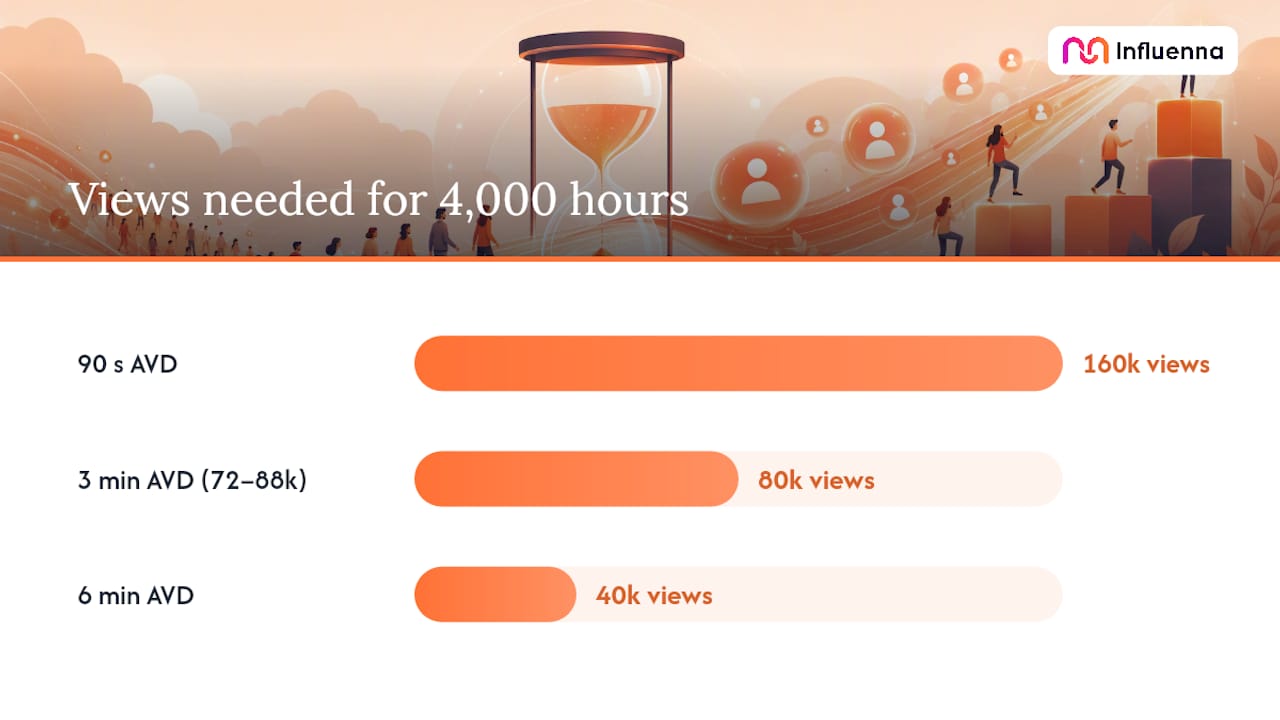
The math is straightforward once you know your channel's average view duration: divide the total minutes you need (4,000 hours × 60) by your AVD in minutes.
That 3-minute example lines up with what most watch-time calculators assume as a default, landing in the 72,000 to 88,000 view range depending on rounding.
- Check the calculator output against your own historical AVD in the Content tab. A channel that runs a 6-minute AVD needs far fewer views than one averaging 90 seconds.
- Set two goals at once: a video-level average view duration target for new uploads, and a channel-level watch time target for the rolling 12-month window.
What Should You Test in Your First 30 Days?
Run experiments in sequence, not all at once, so you can actually tell what worked. Start with hook and thumbnail tests, since they move the retention graph fastest. Once you've found a stronger opening, shift to retention edits: tighter pacing, fewer dead spots, better chapter breaks. After that, test playlist sequencing and end screens to see if session watch time climbs. Collaboration tests come last, once your own retention is solid enough that a shared audience actually sticks around.
Watch AVD and the retention graph first; they usually shift within a week. Session duration and subscriber conversion take longer, closer to three or four weeks, to show a real pattern.
The mistake most creators make is stacking five changes into one upload and then guessing which one worked. Isolate the variable, run it for at least a week of consistent posting, and let the retention graph tell you the truth before you scale it across the channel.
— Igor
Can Collaborations Add Qualified Watch Time?
Guest appearances, co-created playlists, and cross-promotions bring a new audience segment to your channel, often with better initial retention because they arrive with context. Lean on collaborations once your own retention and hook are solid; before that, organic tactics like retention edits give you more control over the outcome.
Curated Collaborations Without the Cold-DM Grind
Finding the right creator, brand, or agency to co-create with usually means digging through inconsistent DMs or guessing at fit from follower counts alone. Influenna is a curated marketplace where every creator, brand, talent agency, and influencer marketing agency is reviewed by a person before joining, so collaboration requests go to accounts that are actually vetted, not cold pitches into the void.
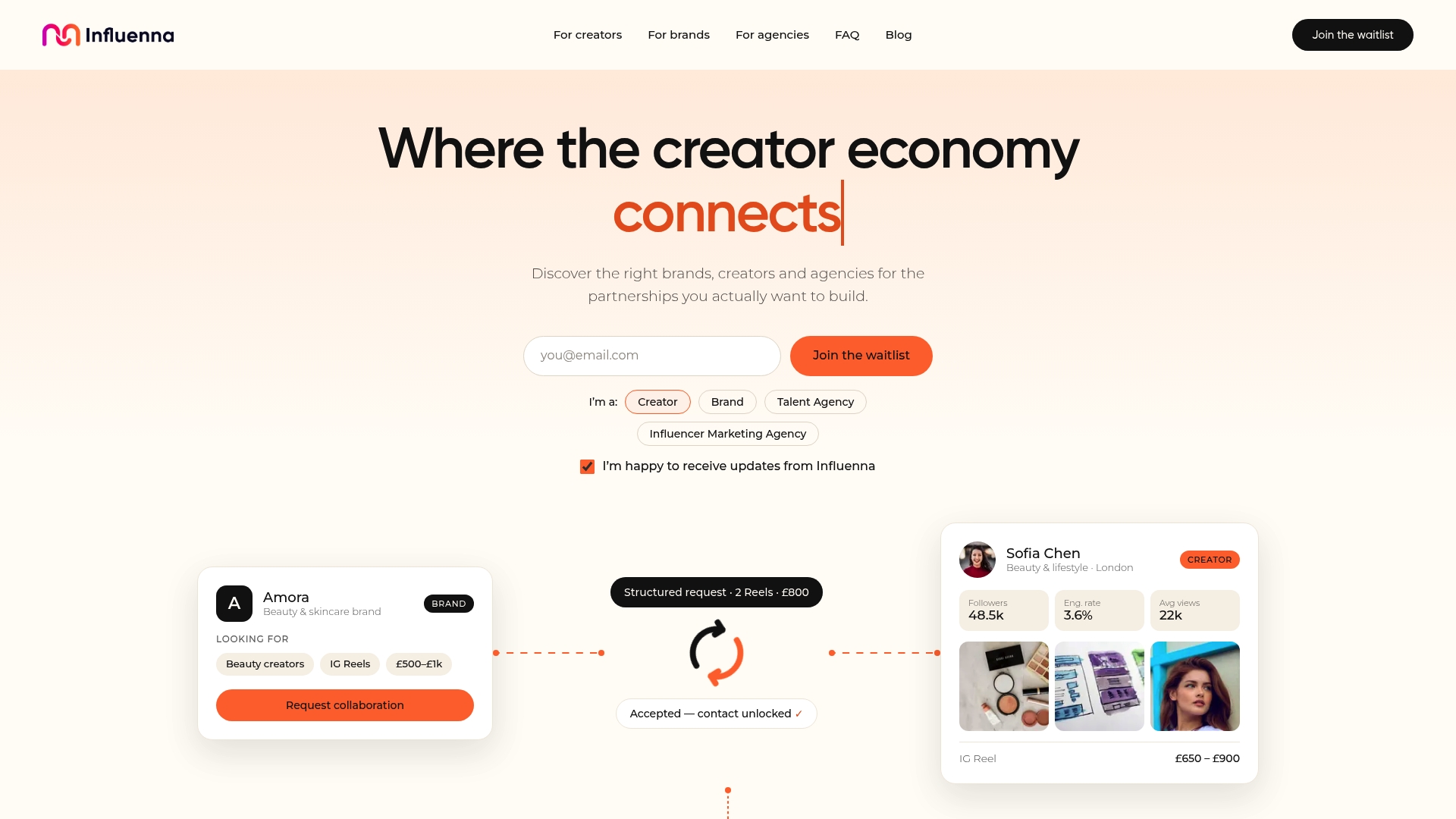
Instead of chasing outreach that goes nowhere, you send a structured request with your rates and preferences already laid out, and contact details only unlock once both sides say yes. For creators looking to extend session watch time through smarter co-creation and cross-promotion, joining the Influenna waitlist is the place to start.
Sources
- What counts as qualified watch hours and views for YouTube monetization
- Metrics | YouTube Analytics and Reporting APIs
- Overview of YouTube Analytics and the Engagement tab
FAQ
What Does a 4.3% Watch Time on YouTube Mean?
It signals a weak hook or a mismatch between the thumbnail promise and the content, and it's worth checking your retention graph to find the exact drop-off point.
Can You Check Your YouTube Watch Time?
Yes. Open YouTube Studio, go to Analytics, and check the Overview or Engagement tab for total watch time hours, average view duration, and per-video retention graphs.
How Long Does It Take to Get 4,000 Watch Hours on YouTube?
There's no fixed timeline; it depends entirely on your upload frequency, average view duration, and view volume. A channel averaging a 3-minute AVD needs roughly 80,000 total views to hit 4,000 hours, but that can take months or years depending on how fast your videos gain traction.
How Does YouTube Watch Time Work?
YouTube tracks the actual seconds each viewer spends watching a video, adds those seconds across every playback surface, and totals them into minutes and hours. Only qualified public long-form and archived livestream minutes count toward Partner Program eligibility, while most Shorts feed time and private or unlisted views do not.