Media Kit Examples for Creators and Brands: Ready-to-Use
17 min read

The fastest path to a professional media kit is to copy what already works. Start with one of these three: the Garden & Gun 2026 media kit PDF for a high-production publisher model, Hootsuite's influencer kit template for creator-focused layout inspiration, or a Canva media kit template for a free, editable starting point you can customize in under an hour.
- Publisher model: Garden & Gun PDF — shows editorial calendar, ad packages, and distribution in one polished document.
- Influencer template: Hootsuite's free kit — structured for niche creators with engagement rate, audience demographics, and past partnerships.
- Free template: Canva — hundreds of layouts, PDF export, and no design experience required.
The sections below walk through annotated examples, a component checklist, tool comparisons, a step-by-step build process, design and metric guidance, and an update schedule. Everything you need to go from blank page to shareable kit.
Key Takeaways
A media kit's job is to pre-answer every question a brand or agency would ask, so the only conversation left is whether the fit is right.
| Point | Details |
|---|---|
| Start with a proven template | Use Canva, Adobe Express, or Figma to build from a tested structure rather than a blank page. |
| Lead with engagement, not followers | Show platform-specific engagement rates and label each figure as verified, estimated, or self-reported. |
| Include one compact case study | A past campaign with duration, deliverables, and one measurable KPI outperforms uncontextualized screenshots. |
| Use a hosted URL as your living kit | A single link stays current automatically; keep dated PDF archives for negotiation records. |
| Update at least quarterly | Refresh stats, swap in newer top posts, and check all links every three months at minimum. |
| Influenna for vetted connections | Influenna's curated marketplace surfaces creator profiles with labeled metrics to brands actively seeking partners. |
Table of Contents
- 8 Media Kit Examples Worth Copying Right Now
- What Every Media Kit Must Include
- Which Tools Help You Build and Download a Media Kit Template
- How to Build a Media Kit You Can Share With Brands
- Design Rules and the Metrics Brands Actually Care About
- What Brands and Curated Marketplaces Look for When Screening Kits
- When to Update Your Media Kit and How to Keep It Current
- The Part of Your Media Kit Most Creators Get Wrong
- Influenna Connects Creators With Brands That Are Already Looking
- Sources
8 Media Kit Examples Worth Copying Right Now
These eight samples cover the main kit types: publisher, corporate, influencer, UGC creator, and template-based. Each annotation explains the one thing that makes it worth studying.
1. Garden & Gun 2026 media kit (publisher PDF)
Best for: Print and digital publishers, editorial brands, advertising sales teams.
The Garden & Gun 2026 media kit is a masterclass in what a publisher kit should contain: editorial calendar with close dates, multi-platform distribution figures, audience demographics, and advertising package options, all in a high-resolution PDF. The layout uses full-bleed photography and a clean type hierarchy so a media buyer can scan it in 60 seconds. If you publish a magazine, newsletter, or editorial site, this is the benchmark to measure your own kit against.
2. HubSpot's curated corporate and brand kit examples
Best for: Brand managers, corporate communications teams, SaaS companies.
HubSpot's media kit examples post collects real-world kits from companies like Hinge, Delta, and Canva. What stands out is the modular structure: each kit separates press assets, brand guidelines, and executive bios into clearly labeled sections. A brand manager can lift that architecture directly. The downloadable assets and clear navigation make these useful models for anyone building a corporate press kit from scratch.
3. Hootsuite's influencer media kit template
Best for: Micro-influencers, niche content creators, travel and food bloggers.
Hootsuite's free influencer kit prioritizes the metrics brands actually care about: engagement rate by platform, audience demographics, and a short case study from a past partnership. The template keeps follower counts secondary to engagement data, which is the right call. Hootsuite's guidance makes clear that brands focus on measurable outcomes over raw follower totals, so the layout reflects that priority from the first page.

4. Adobe Express media kit example
Best for: Creators who want a polished, branded kit without hiring a designer.
Adobe Express's media kit guide walks through a complete kit structure: audience overview, engagement metrics, content samples, past brand partnerships, rates, and contact information. The interactive elements (clickable links, embedded video) increase discoverability, though Adobe Express also recommends keeping a clean PDF version for agencies that prefer a static file for initial review. The dual-format approach is practical and worth adopting.
5. Canva media kit template (free, editable)
Best for: Creators and small brands building their first kit, anyone who needs a fast start.
Canva's media kit templates offer hundreds of layouts covering influencer, brand, and publisher formats. You edit directly in the browser, swap in your brand colors and fonts, and export as a PDF or shareable online document. The templates are built around the core elements Canva recommends: bio, audience metrics, content samples, rates, and downloadable assets. For a first kit, this is the lowest-friction option available.
6. Figma community content creator template
Best for: Designers, agencies, and creators who want a fully editable, collaborative file.

The Figma community content creator media kit template is a free, shareable file that teams can edit simultaneously. Unlike a PDF, a Figma file lets you maintain a master version and push updates without re-exporting. The template includes placeholder sections for platform metrics, past brand work, and services, and the component structure makes it easy to add or remove pages as your kit grows.
7. Presspage newsroom-style hosted kit
Best for: Larger organizations, PR teams, brands managing ongoing press relationships.
Presspage's approach shows how enterprise organizations build hosted press kits: assets organized by topic (products, leadership, sustainability), live updates from a single URL, and a structure designed for journalists who need to filter quickly. The key insight is that a hosted kit eliminates the outdated-PDF problem entirely. When a journalist or agency partner revisits your kit three months later, they see current data, not the numbers you had when you first sent the file.
8. HubSpot media kit template (downloadable)
Best for: Marketers and creators who want a structured, plug-and-play starting point.
HubSpot's media kit template resource provides a downloadable file with pre-built sections for bio, audience overview, metrics, services, and contact information. The template-driven workflow speeds creation and keeps brand color and layout consistent from the first draft. It is a practical middle ground between a blank Canva canvas and a fully custom Figma file.
What Every Media Kit Must Include
A strong kit answers three questions without requiring a follow-up email: Who are you? Who is your audience? How do we work together? These components cover all three.
- Bio / about: Two to three sentences on who you are, your niche, and what makes your content distinct.
- Audience overview: Age range, gender split, top geographic markets, and income or interest data where available.
- Platform-specific metrics: Follower count, average reach, impressions, and engagement rate shown separately for each platform (Instagram, TikTok, YouTube). Label each figure as verified (pulled directly from platform analytics), estimated (third-party tool), or self-reported (manually entered). Never blend figures across platforms into a single average.
- Top-performing content examples: Three to five posts or videos with their actual performance numbers, not just screenshots.
- Services and deliverables: Specific formats you offer (Reels, dedicated YouTube video, newsletter mention, Stories series) with typical turnaround times.
- Rate card: Either a published rate range or a note that rates are available on request. Pricing transparency shortens negotiation cycles.
- Case study: One past campaign with duration, deliverables, and a measurable outcome (reach, click-through rate, sales uplift). A compact case study does more work than ten uncontextualized screenshots.
- Testimonials or press mentions: One or two short quotes from brand partners or links to press coverage.
- Downloadable assets: High-resolution headshots, logo files, and any brand guidelines a partner might need.
- Contact and booking instructions: A direct email address or booking link, plus your preferred response window.
Pro Tip: Avoid leading with combined follower totals across platforms. Brands and agencies cross-check numbers, and a blended figure that doesn't match platform analytics damages credibility immediately. Show engagement rate and a short case study with a measurable outcome instead.
Which Tools Help You Build and Download a Media Kit Template
Four tools dominate the media kit creation space, and the right one depends on your skill level and how you plan to distribute the finished kit.
Canva is the fastest option for most creators. Hundreds of pre-built templates, browser-based editing, and one-click PDF export mean you can go from blank to shareable in under an hour. The trade-off is limited layout flexibility: you work within Canva's grid system, and deep customization requires a paid plan.
Adobe Express suits creators who want stronger brand controls. The tool supports custom fonts, brand color palettes, and interactive elements like embedded links. Adobe Express also favors PDF exports for stable sharing while supporting interactive versions, which makes it practical for the dual-format approach (one PDF for email, one hosted link for your bio).
Figma is the choice for designers and teams. Free community templates are fully editable, collaborative, and version-controlled. The learning curve is steeper than Canva, but the output is more flexible: you can build a responsive layout, maintain a master file, and push updates without re-exporting every time.
Pinterest is not a creation tool, but it is the best place to collect media kit design ideas before you start building. Search "media kit design" or "influencer media kit layout" and you will find hundreds of real examples organized by niche and style.
On export format: Use a PDF when you are sending a kit cold via email or attaching it to a pitch. Use a hosted URL (Canva online doc, Figma prototype link, or a dedicated page on your site) when you want a living kit that stays current without resending. For most creators, the practical answer is both: a hosted URL in your bio and email signature, plus a dated PDF saved for negotiation records.
How to Build a Media Kit You Can Share With Brands
Follow these steps in order. Skipping ahead to design before you have gathered your assets is the most common reason kits take three times longer than they should.
- Define your goal and audience. Are you pitching brands for sponsored content, approaching press for coverage, or presenting to an agency? The answer changes which metrics you lead with and how you frame your services.
- Gather your stats. Pull platform analytics directly: Instagram Insights, TikTok Analytics, YouTube Studio. Screenshot or export the data so you can label it as platform-verified.
- Write a short case study. Pick one past campaign or strong organic post. Note the duration, deliverables, and one measurable outcome (reach, saves, link clicks, or sales). Three sentences is enough.
- List your services and rates. Write out every deliverable you offer with a realistic turnaround time. Decide whether to publish rates directly or note "rates available on request." Either is fine; vagueness is not.
- Design and layout. Open your chosen template (Canva, Adobe Express, or Figma) and drop in your content. Use your brand colors and one or two fonts. Keep it to two to four pages.
- Export or publish. Export a PDF for static sharing. Publish a hosted version for your bio link and email signature.
- Test links and accessibility. Click every link in the PDF and hosted version. Check that images have descriptive file names, text contrast is readable on mobile, and the file size is under 5 MB for email.
- Distribute. Name your PDF clearly: YourName_MediaKit_2026.pdf. Add a short branded URL or QR code to the hosted version. Include the link in your email signature, Instagram bio, and any press folder you maintain.
Design Rules and the Metrics Brands Actually Care About
A media kit that looks unprofessional signals that the creator's content will too. These design principles apply whether you are using Canva or a custom Figma file.
Design checklist:
- One primary font for headings, one for body text. No more.
- Brand colors used consistently across every page.
- Images at minimum 300 DPI for print, 72 DPI optimized for web.
- Mobile-friendly layout: test the hosted version on a phone before sharing.
- Readable contrast: dark text on light backgrounds, or vice versa. Avoid light gray text on white.
- Alt text on images in hosted versions for accessibility.
Which metrics to include:
Brands and agencies evaluate kits on engagement quality, not audience size. The metrics worth showing, by platform:
- Instagram: Engagement rate (likes + comments + saves ÷ reach × 100), average reach per post, Stories views, audience demographics.
- TikTok: Average views per video, engagement rate (likes + comments + shares ÷ views × 100), follower growth rate, top video performance.
- YouTube: Average views per video, watch time, subscriber count, click-through rate on thumbnails, audience retention percentage.
Engagement rate formula (Instagram and TikTok):
Show this figure per platform, labeled with its provenance. A figure pulled directly from Instagram Insights is platform-verified. A figure calculated manually from public data is self-reported. The distinction matters to any agency that cross-checks numbers before signing a contract.
As Hootsuite's influencer kit guidance makes clear, engagement demonstrates authentic audience interaction in a way that raw follower counts simply cannot.
What Brands and Curated Marketplaces Look for When Screening Kits
Brands and marketplaces do not read media kits the way a reader reads an article. They scan for specific signals, and if those signals are missing or unclear, the kit goes to the bottom of the pile.
Insider checklist:
- Clarity of offerings: Can a brand manager understand exactly what they are buying in 30 seconds? If not, the kit needs editing.
- Up-to-date verified metrics: Stats older than three months raise flags. Label the date of your last analytics pull.
- Examples with measurable outcomes: Screenshots of posts are table stakes. A compact case study with a KPI result is what separates a strong kit from an average one.
- Available deliverables and turnaround: List formats and realistic timelines. "Reels: 5-business-day turnaround" is more useful than "social media content."
- Pricing transparency: A rate range or a clear "rates on request" note. Blank space where pricing should be reads as unprepared.
- Contact and availability: A direct email and a note on your current booking window.
Curated marketplaces place additional weight on verified metrics and clearly stated rates because their review process involves a human evaluator, not just an algorithm. A kit with platform-verified engagement figures and a published rate range moves through that review faster than one with self-reported totals and no pricing signal.
Pro Tip: Keep two versions of your kit: a public-facing summary (bio, metrics, content examples, general rate range) for your bio link and cold outreach, and a private detailed rate card you share only after an initial conversation. The public version opens the door; the private version closes the deal.
When to Update Your Media Kit and How to Keep It Current
A media kit with six-month-old stats is worse than no kit at all. It tells a brand you are not paying attention.
Update cadence:
- Refresh stats and top-performing content at least once per quarter.
- Update immediately after a major follower or engagement milestone.
- Add a new case study within two weeks of completing a notable campaign.
- Revise rates whenever your standard pricing changes.
Versioning approach:
- Maintain one hosted URL as your living kit. This is the link in your bio, email signature, and any press folder. When you update it, every partner who has the link sees current data automatically.
- Save a dated PDF archive after each quarterly update: YourName_MediaKit_Q1_2026.pdf. Keep these for your own records and for negotiation situations where a brand wants a static snapshot.
- Label the hosted version with a "Last updated: [Month Year]" note in the footer so reviewers know the data is current.
Maintenance checklist:
- Pull fresh platform analytics and replace old figures.
- Swap in a newer top-performing post if a recent one outperforms the examples currently shown.
- Check every link in the PDF and hosted version for broken URLs.
- Confirm your contact email and booking link are still active.
- Review your rate card against current market rates for your niche and platform.
Pro Tip: A single hosted URL is the most underrated distribution tool a creator has. Share it everywhere once, update it in one place, and you never have to chase down old PDF versions you sent six months ago.
The Part of Your Media Kit Most Creators Get Wrong
That ratio should be reversed.
A beautifully designed kit with vague or unverified numbers does not get a creator further than a plain one with clear, labeled data. Brands and agencies have seen enough polished PDFs to know that good design is table stakes. What actually moves a decision is specificity: a platform-verified engagement rate, a case study with a real KPI, and a rate card that tells a brand manager whether you are in their budget before they have to ask.
The other mistake is treating the media kit as a one-time deliverable. Canva's guidance on maintaining accurate kit elements and Presspage's recommendation for hosted, live-updated press kits both point to the same principle: a kit that goes stale is a liability, not an asset. A brand that checks your kit in January and again in April should see different numbers, because you have been working.
The creators who get the most inbound partnership requests are not necessarily the ones with the best design. They are the ones whose kits make a brand's job easy: clear deliverables, honest metrics with labeled provenance, and a case study that answers "what did you actually deliver?" before anyone has to ask.
Influenna Connects Creators With Brands That Are Already Looking
Building a strong media kit is the first step. Getting it in front of the right brands is the second, and that part is where most creators lose time to cold outreach that goes nowhere.
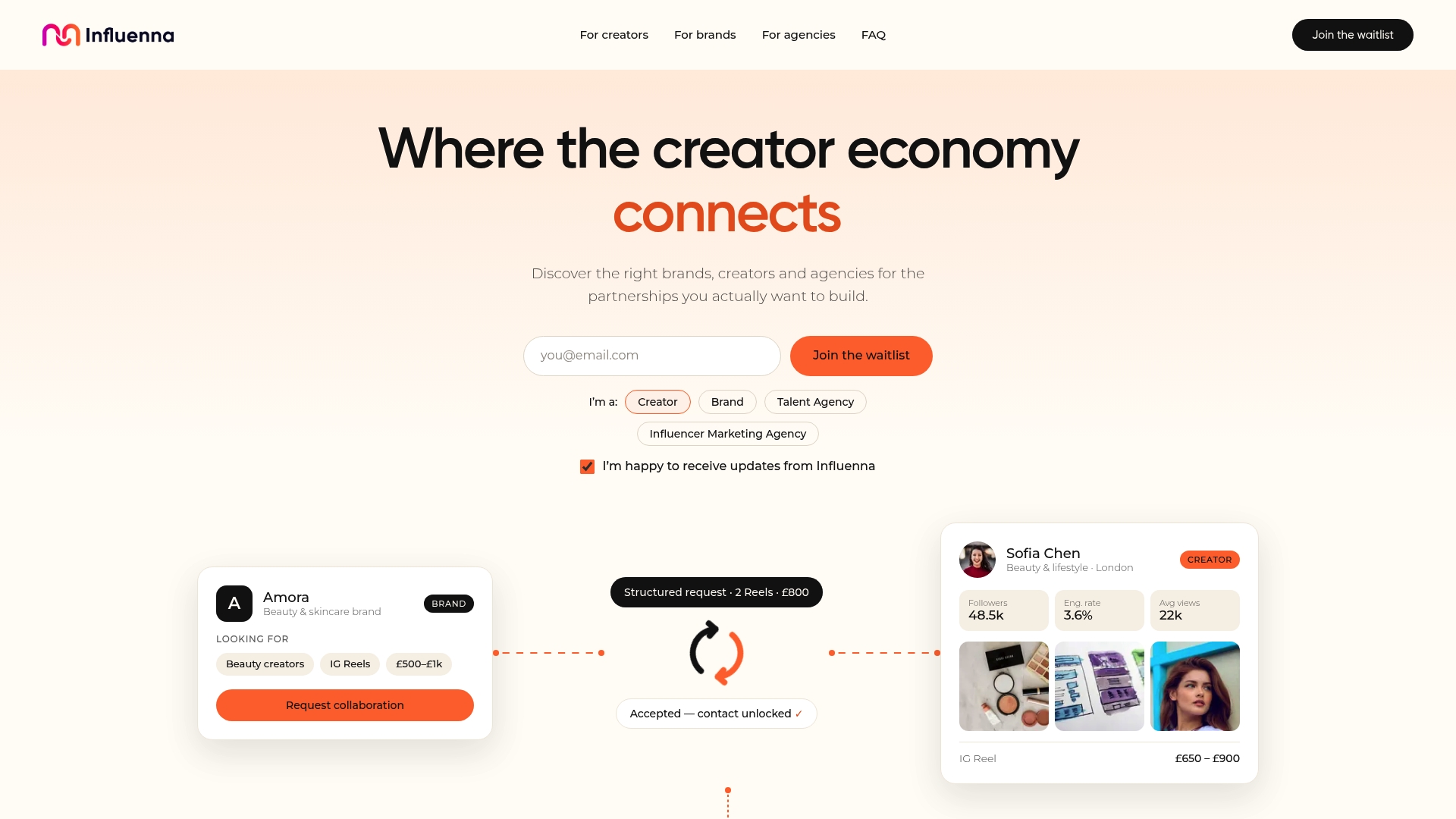
Influenna is a curated collaboration marketplace where creators, brands, talent agencies, and influencer marketing agencies connect through structured requests, not cold DMs. Every account is reviewed by a person before joining, so when a brand sees your profile, they are already in a context where they are actively looking for creators to work with. Audience metrics on Influenna are labeled by provenance (verified, estimated, or self-reported) and shown by platform, which means the clarity you build into your media kit translates directly into how your profile reads to a brand evaluator.
Influenna is currently pre-launch. If you are a creator, brand, or agency ready to connect with vetted partners, Influenna to be among the first to access the marketplace when it opens.
Sources
- How to create a standout media kit with free templates (Adobe Express)
- What is a Media Kit — and How to Make One That Wows +Examples (HubSpot Blog)
- Influencer media kit 101: Free template and expert tips (Hootsuite)
- How to create a press kit in 2026 | Presspage